



Backup batteries for cameras : what you need to know
Taking a great photo is often a matter of timing. And nothing is more frustrating than seeing a ‘low battery’ message appear just before an important moment. It's at times like these that you realise how useful a spare battery can be.
Often overlooked when purchasing a camera, an extra battery is an essential basic accessory. It ensures continuity, especially when shooting for long periods of time or in places where it is difficult to recharge your camera.
But how do you choose the right one? How can you tell when a battery is worn out? And what should you do if your camera no longer charges? This guide answers all these questions in a simple way to help you stay ready to capture every moment.
Why have a spare battery for your camera?
When you're new to photography, you often think about the camera body, the lens, or the memory card. But the battery sometimes takes a back seat... until the day it dies without warning. Having a spare battery isn't a luxury, it's a safety net. Here's why it's an essential accessory.
Why have a spare battery for your camera?
An extra battery helps you avoid unexpected power cuts, especially in the middle of a photo shoot. Even if your camera still shows a few percent of battery life, it can suddenly shut down, especially in cold weather or after prolonged use. Don't forget to empty your memory card frequently to avoid this kind of unpleasant surprise. You never know when a memory card bug combined with a battery failure might occur.
It's also a good way to avoid depending on an electrical outlet. When travelling, you don't always have the time or opportunity to recharge your equipment. A charged, ready-to-use battery allows you to continue shooting without stress.
It is particularly useful when travelling, at a wedding, on a hike or during a film shoot, where you take a lot of photos throughout the day. Having a second one on hand ensures you don't miss the best moments.
How does a backup battery work?
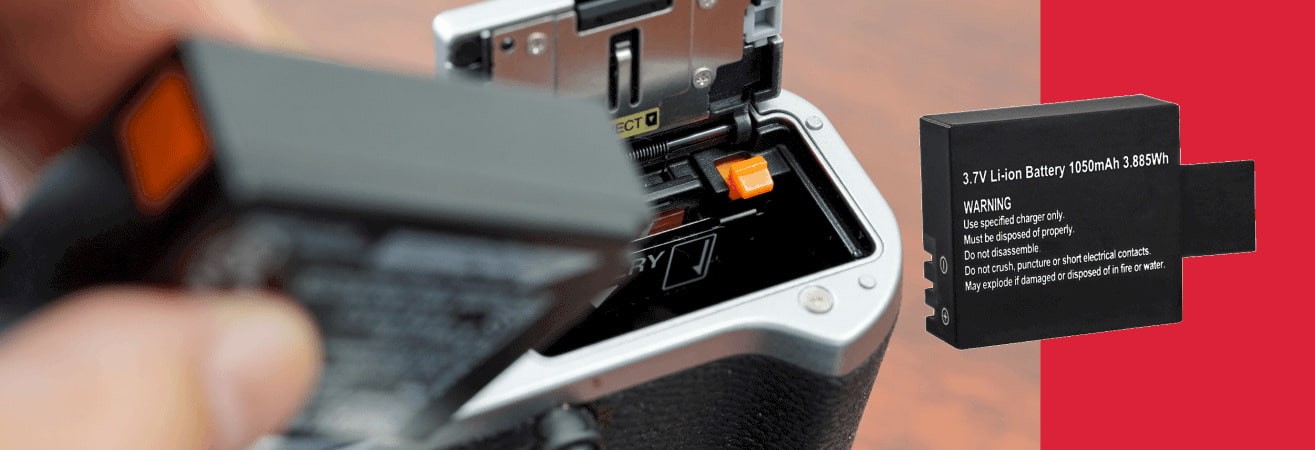
A backup battery works exactly like the main battery. It has the same shape, the same characteristics and is placed in the same location. In the camera body or sometimes in a camera grip if you use one.
It should not be confused with an external battery or power bank, which is used to recharge the battery via a USB cable. However, it cannot directly power the camera while shooting (except for certain specific models).
The idea is simple: while you are using one, the other is charging or on standby. This rotation gives you comfortable autonomy, even during long or unexpected sessions.
How can you make the battery last longer?
Even a spare battery can wear out too quickly if it is used incorrectly. A few simple steps can help preserve its autonomy over time.
Start by switching off the device as soon as you are no longer using it, even for a few minutes. Leaving the screen on consumes a lot of energy. Also limit the use of the flash, which puts a heavy strain on the battery, especially in burst mode.
If your device has an energy-saving mode, activate it. This adjusts the display and automatically puts the device into standby mode after a short period of inactivity.
Finally, remember to recharge your batteries regularly, even if you don't use them every day. This prevents them from completely discharging, which can reduce their long-term life.
Identifying signs of wear and tear and resolving charging issues
Even if you take good care of your batteries, they will not last indefinitely. Like all electronic equipment, they age, lose efficiency and may eventually stop working altogether. Here's how to spot the first signs of wear and tear and respond to the most common charging issues.
How do I know if my battery is at the end of its life? How do I know if my camera battery is dead?
A battery at the end of its life is not always immediately recognisable, but there are some tell-tale signs. The most common is a rapid loss of battery life. Your device goes from 100% to 20% in a matter of minutes, even without intensive use.
The device may also switch off without warning or restart on its own even though the battery still appears to be charged. Another indicator is that the battery no longer reaches 100% when charging, or the charging time becomes abnormally long.
The age of the battery is inevitably a factor. In general, after 300 to 500 full cycles, performance begins to decline. If your battery is several years old, these signs are often a signal that it is time to consider replacing it.
How can you tell if a camera battery is faulty?
Before concluding that your battery is dead, it is useful to perform a few simple tests. Start by switching to another battery, if you have one. If the problem disappears, this confirms that the first battery is the cause.
You can also try a different charger. Sometimes it is not the battery that is faulty, but the charger itself that is no longer supplying enough power.
Also observe the behaviour of the battery when inserted. If it does not fit properly, heats up abnormally, or causes an error message, it is best not to use it. This may be a sign of internal damage or deformation.
Why is my camera no longer charging?
When your device no longer charges, it is not always easy to know where the problem lies. There could be several reasons.
Start by checking whether the battery is still in good condition. If it is too old or too low, some devices will simply refuse to start charging.
An incompatible or damaged charger can also prevent charging. Try using a different cable or mains adapter, especially if you are using a universal model.
Finally, remember to inspect the battery and device connectors. Dust, oxidation or a poor connection can block the contact. A quick clean with a dry cloth or cotton bud is often enough to restore charging.
Charging properly and choosing the right backup battery
To keep your camera operational at all times, it's not enough to just have an extra battery. You also need to know how to charge it properly and how to choose the right one when you buy it. Here are some useful tips to avoid unpleasant surprises and increase your daily battery life.
How can I charge my camera battery?
There are several ways to charge a camera battery. The most common method is to use the mains charger supplied with the device. It allows for a full charge in a few hours, often with an indicator light that shows the progress.
Some recent models can also be charged via a USB cable, plugged directly into a computer or mains adapter. This is convenient when travelling, but can sometimes be a little slower.
To save time, you can also use a dual charging station, which allows you to charge two batteries at the same time. This is a good investment if you often use your device for long periods of time.
In any case, it is important to follow the charging time indicated in the manual and not to leave a battery plugged in unnecessarily once it is full.
What criteria should be taken into account when choosing a battery?
Not all batteries are created equal. To avoid mistakes, start by checking the exact reference of the original battery. This is usually found on the battery label or in the device manual.
Next, compare the technical specifications: the capacity (expressed in mAh) indicates the theoretical battery life, and the voltage (in volts) must always match that of the original model. A battery with a different voltage could damage the device.
You will have the choice between an official battery (supplied or approved by the brand) and a compatible battery (often less expensive). The latter can work very well, provided you buy them from reliable manufacturers. Always check the seller's reviews and reputation.
Finally, make sure that the battery is new. A battery that has been stored for too long may already have lost some of its capacity.
By taking all this advice into account, you can avoid one of the classic mistakes made when buying your first camera.
Small gestures that make a big difference to your camera battery
A few simple habits can increase the life of your batteries, whether they are main or backup batteries.
Store them at room temperature, away from humidity and excessive heat. Avoid leaving them in the car in the middle of summer or on a radiator.
It is also advisable not to always wait until they are empty before recharging them. Regular partial recharging is better for their longevity than a full cycle each time.
Finally, if you are going on a trip, remember to fully recharge your spare battery in advance. Having a full battery in your bag means you can continue shooting with complete peace of mind.
A spare battery: a habit worth adopting
Whether you're an amateur or an enthusiast, having a spare battery for your camera makes all the difference. It gives you more freedom, more peace of mind and saves you a lot of frustration when shooting sessions go on for hours.
With a few good habits, it's easy to extend the life of your batteries and make the right choice when purchasing them. Taking care of this accessory means taking care of your equipment... and your memories.
The next time you take out your camera, remember to slip a charged battery into your bag. You won't regret it.